Archive for admin

5 Best Blogs to Follow About Using Hashtag

Hashtag

A #Hashtags on social media is basically (#) sign followed by a keyword. For example #nfinity8weekend #ilovecoffee are both hashtags. The purpose of using Hashtag is mainly to immediately expand your topic to all online audience and get a response. Best practices for journalists according to Forbes when individual use a hashtag within their tweet, engagement can increase as much as 100%; brands could get an increase of 50%. No wonder people are curious about placing hashtags in their post.

The question now is how to come up with the most relevant Hashtags, and how to use them the right way for your content. Firstly, you should know your purpose and why are you using it. Second is know your audience. Finding the right Hashtag might seem to be difficult as we want to take a look here at how your brand can use hashtags with success, on all social media platform.

Here is the list of best blogs to follow about using the hashtag:

1. How to Use Hashtags: How Many, Best Ones, and Where to Use Them – Buffer’s blog

Kevan Lee shares that in finding the best hashtags for your content make sure you’ve got them in the right number, on the right social network.

Choosing the right hashtag tools will help you find, create, analyze, and track hashtags that matter to your brand. Also, makes it easier for you to achieve your goals.

2. Hashtag Mistakes and How to Avoid Them – Social Media Today

Dhariana Lozano pointed out that “The easiest hashtag mistake to make is to only use popular hashtags.” She even goes further saying that hashtags like #love and #beautiful have hundreds of thousands of posts, but these generic hashtags are going to be useless for your business. You’ll get likes, but not from people who are actually interested in your business or brand.

It is actually right to choose a hashtag that is popular – but not too popular as the competition is high does your post will easily get lost and you will not get the best result you need. In practice seek hashtag that specifically targets the audience you need and should be related to your post.

As noted by The Social MS base 10k to 100k is usually a good number to target. Anything more, that hashtag is not going to work.

What I usually do is to check successful accounts related to my industry and see what hashtags the best work for them. It really helps me with my hashtag strategy.

3. The Ultimate Guide to Hashtags – Socialbakers

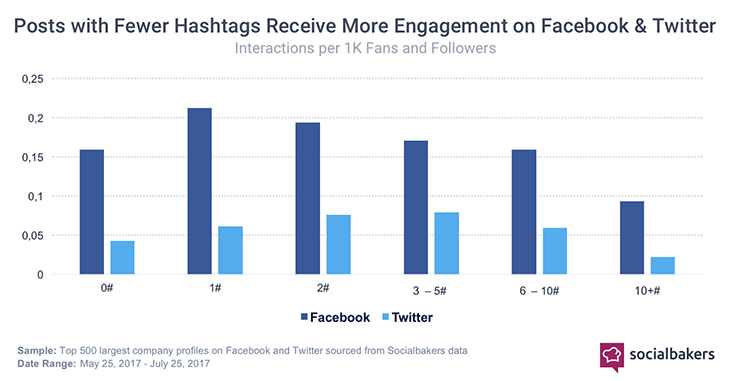
According to Socialbakers data, more hashtags used on a Facebook result in less engagement, while using just one hashtag seems to be better than not using any at all. On the other hand, interactions on the Twitter rise when brands are in the sweet-spot of three to five hashtags.

hashtag marketing

As what William Miller implies be careful about using #Too #Many #Hashtags. Using too many hashtags is generally considered bad form on personal profiles, it applies doubly for brands.  Make sure you test, research and rethink to come up with a great hashtag applies doubly for brands.

Studies show that using 11 hashtags per post generates the most engagement. Although using the limit of 30 is not a bad idea at all.

4. Tips from Postplanner

Don’t put your #hashtag in the middle of the #sentence. That makes #reading the sentence #annoying. Instead, write out your whole post. At the bottom of the post, add the hashtags.

5. How to Use Hashtag Analytics to Improve Your Marketing Efforts – Sproutsocial

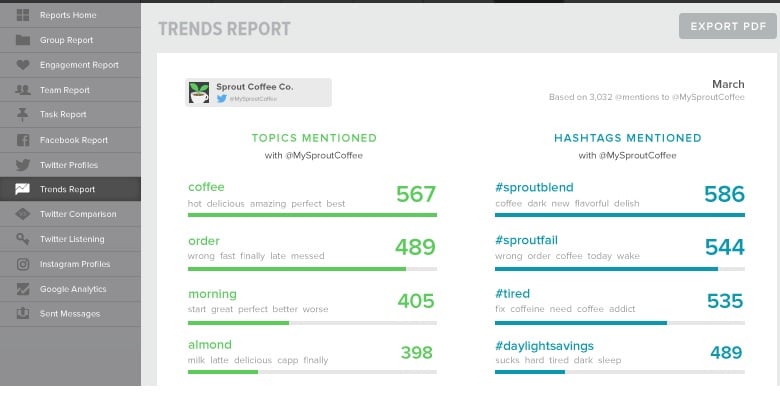
Hashtags, if used correctly, are a great tool to track conversations about brands, companies, or events. Monitor your top performing hashtags, share content related to them, and use the hashtag frequently.

Dominique Jackson says tracking social media activity is one of the biggest struggles companies have faced since the early stages of social media marketing. One study showed 39% of businesses don’t measure their social media ROI due to a lack of analytics, resources or expertise.

Learning to use hashtag analytics will help you able to run organized campaigns.

hashtag marketing

To sum it up you have to test and do your research to figure out what works best for your content. Do you want this post delivered right to your inbox? SIGN UP HERE.
How to Create a Post on Google My Business?

google my business

Google My Business is a new feature in Google that offers a real-time communication channel to reach your customers. A business owner can now publish their New Products, Special Offers, Events, and Services that will appear on Google Search and Maps in few moments. Now Google My Business help businesses attract more attention to their brands and increase online visibility.


Keys to consider in writing a post:

  1. Type of Post  – This indicates the type of content you want to publish. What do you want to post? Whether to tell your follower to visit your store, sell something or announce special offers, Launch new products.
  2. Photos – Photos should be at a minimum resolution of 720-pixel width by 540-pixel height, and format must be in JPG or PNG.
  3. Title – Describe your post in 4-5 words or 58 characters for your title.
  4. Content –  Make sure that your content meets Google My Business guidelines and best practices. Described the full details of your post. The ideal length is between 150-300 characters.
  5. Call to action: Include instructions such as Buy, Book online, Learn More, Call, or  Visit.


Step on How to create a Post from your Google My Business and have your content appear on Google Search and Maps in a real time.


Do you need help on Google My Business Management? SIGN UP HERE


Discover the new AdWords experience

adwords

AdWords is Google’s publicizing framework.  With the new AdWords experience, you can reach your business goals and save time to ease your decision-making when you create a search network or Display Network campaign by guiding you to the specific features to help your ad campaign succeed.  It also offers to clarify Quality Score, cost-per-click and click through rate. Paige Bowen says AdWords has recently had a makeover, and with it comes some brilliant new tools and features designed to enhance reporting for all elements of your paid search account. From search to Shopping to Google display network.


Google continue introducing a new experience for advertisers to be more focus on business goals,  faster and more intuitive. Advertise your product or service right to someone who is ready to buy. Also, you can reach the right audience with remarketing list for search ads.


Google walks you through tools and tips to help you save time and get more done with faster access to what you use, and gain actionable insights with new graphs and reporting tools.


Do you need help with Google Adwords? SIGN UP HERE

Best Tools to Analyze Competitors on Social Media

Analyze Competitors on Social Media

Check what your Competitors are doing in Social Media

To analyze Competitors on Social Media, your strategy must include research and monitoring. Indeed, analysis of competitors   allows you to compare your brand and you can easily assist and recognize your engagement and budget.  Also, measuring your competition gives you a wide picture on how to improve your Social Media Strategy.

Measuring social performance requires a comprehensive strategy as it involves interpreting, data gathering and online traffic monitor. In any case, your analysis must include your competitor’s strength as well as their weaknesses.

How to perform analysis? Read more of Social Media Examiner’s Article to know more of the free tool analysis and research tool to compare your social media presence with your competitors.


Do you need help to Analyze Competitors on Social Media ? SIGN UP HERE


How to use facebook ads to increase your Business Visibility

How-to-use-Facebook-Ads

Below are the different types of Facebook Ads that increase you business online visibility

1. Promote your Post

Facebook marketing and  Facebook ads boosting is the effective way to get more exposure and reach new audience for your advertisements, it can be offers, news or special events. Additionally you can  target people in your local area to boost your sales. This can all be done right from your Facebook Page.


2. Create App Ads

App becomes a necessary tool in increasing business revenue and engagement. You can connect better with your customer or ad users they can easily click, like, comment, share and install your app.  App Ads can either Desktop App Ads or Mobile App Ads: With Desktop App Ads, you can promote your app in the News Feed on Facebook and with Mobile App Ads, you can promote your app in the Facebook Mobile News Feed.


3. Increase Website Traffic from Facebook

Add Facebook Share Buttons to your Website, make it easy for your content to be shared on Facebook. In fact sharing interesting tips, news, Pictures of your products and services is the easiest way to build engagement to your followers. Make sure you include your website link to get people to visit your website.


4. Reach your target Audience

Set up your audience reach those audiences who are most interested in your ads. Moreover targeting options include Location, Age, Gender and you can even narrow your audience base on their Interest, Demographics, Behaviors and Connections.


5. Get Leads for your Business

Through Facebook you can collect leads by either posting a Landing Page or Creating App for your products or services, for Landing Page you can ask your follower to input their details in exchange with offers or free services  and for app encourage people to download to see more of your updates or offers.


6. Get Video Views

Increase Traffic and Views by promoting your video ads or either by uploading your video directly to Facebook or a platform to do your YouTube marketing. Further, don’t forget to always use a Call to action.


7. Get people to attend your event

Facebook events are a fantastic tool for event Marketing. Create an event facebook ads and share with your fan base or news feed. The Important thing is to re target those people in your connections specially those who are already been going to any event on your page.


8. Get people to claim your offer

Offers are the discount you can create to your Facebook Page and share with your followers or customers to encourage them to shop from your store.


How to Improve Website backlinks for your SEO

backlink infographics

What are backlinks and why are they important?


Website backlinks are the hyperlink from one website pointing back to your website. The number of backlinks a website has indicates the popularity or the importance of the search engine. So, the more backlinks you have pointing back to your site, the more popular it will be, and good backlinks for SEO remain a vital quality ranking signal for Search Engines.


What type of Backlinks your Business really needs and how to get website backlinks for SEO?


Quality backlinks will help you attract visitors to your site. Building a good website is not enough people are going to find you without linking you site to the right direction. Building quality backlinks are one way of attracting visitors to your site.


Neil Patel in his video explains the importance of backlinks on the website.


Do you need help in building backlinks for your SEO? SIGN UP HERE.